03 Sep

StumbleUpon on StumbleUpon and other stuff off the top of my head

I’m quite sure everyone using StumbleUpon has noticed this and feels the same but it really annoys me how you get tons and tons of stumbles about SU in general. I don’t think anyone who uses SU needs a basic introduction. I can’t figure out any good reason for people to keep thumbing up those pages. Which reminds me of a few things about StumbleUpon that I think are not that great.

The whole concept of thumbing sites up or down is a bit confusing affair: often I want to see more pages that I disagree with (I like to amuse myself with that kind of material). So, do I thumb the page up and look like a creationist-racist-whatever to other people, or do I thumb it down and get less unintentionally hilarious pages? They should have two ratings for pages based on if you agree with the page and if you took time to read the page (because, like, this may shock you but SU is mainly for wasting your time).

One thing I think would be nice is that you could explicitly tell SU to send you pages with the specified tags. And, even more valuable would be if you could tell it to never send you any pages with some tag. I’m subscribed to something that sends me tons of SEO tips (i.e. search engine optimizing, the art of creating pages that get a lot of visits thanks to dubious means of getting the page first on Google results instead of because the page kicks ass) that I don’t necessarily agree with nor want to see more of them. However, it is hard to stop receiving those pages and still get the other pages in the category. It would be very convenient to have a filter that filtered out pages with a suitable tag. Maybe the filter should work a bit like how you search the Web, i.e. you would have a search box on the SU toolbar and you would type in a query, and each click on the “Stumble!” button would give the next search result.

Which brings to my last complaint: more tags, please. Even automated tagging would help a lot. After all, in the above case, pages about SEO would be easy to spot because they tend to contain the said term a lot. Or, the term tower defense. God, I hate all those TD games. Also, if you are just submitting a new web proxy site, please die. Those can’t be that profitable.
16 Aug

Viewer2 Build 2630

Some new, cool and experimental stuff. Didn’t feel like drawing the icons for all new features.

  • Sorting by image color metrics (groups similarly colored images)
  • Press Ctrl+L to enforce a link between selected files, Alt+L to sort using the forced links (very experimental)
  • Press Ctrl+P to prefix files (actually renames files, useful for preserving Viewer2 groups on the desktop)
  • New search options, including OR and searching by file date and time viewed. See the manual.

viewer2-installer-2633.exe (bugfix)

30 Jul

Helium pitch-shifter

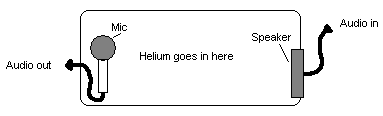
Would this work?

pitchshifter.png

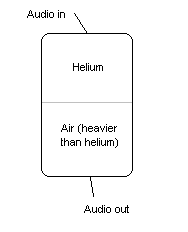
Maybe the tank needs to be upright and filled with helium and some other gas half and half, so there’s a difference in gas density, which compresses the sound waves making the pitch higher. Like this:

pitch2.png

Of course, some other gases could be used for different effects. I think using a combination that would make the pitch lower would result in clean shifting, a situation where there tends to be a lot of phasing. Then again the acoustics of the tank would have to be perfect. But let me think I invented something really clever at least for a while, OK?

20 Jul

Stuff I’d like to see in every user interface

Here’s something that I think would be very nice to have as a standard feature in all user interfaces. I don’t know how much of it has been already implemented in various interfaces out there but I have tried to add an example if I know of any.

Common UI stuff

  • Universal search. You should be able to search any dialog with a lot of text. I use this feature a lot on web interfaces, thanks to the search feature in any web browser. You almost never use every bit of information in a dialog, so this speeds things up a lot.

    There should be an search function that looked into all the menus and dialogs and told you where that elusive checkbox is. E.g. in a web browser you would type in “Accept cookies” and it would tell you it is in Tools>Options>Privacy.

    Google’s, Yahoo’s and other developers’ desktop searches are a step in this direction but they don’t offer that much new. Google Desktop does have a very handy search dialog (double click the Ctrl-key and the search box is summoned – priceless). However, none of the desktop search software I have seen ever is both nice to use and feature rich. Google’s software surprisingly is much worse to use than the web search when you do anything more complex than just check where a file is (and you know its exact filename).

  • Fuzziness. Everything involving user input should have an amount of fuzziness built-in. People make mistakes, computers don’t. Which results in when a computer uses data from a user, it is only as good as the user.

    For example, that search feature I rambled about above could return the exact result and then a list of items that contain the word “cookie” or a synonym to “accept”. That way the dialog box could have the text “Allow cookies” and it still would be in the search results. You have seen this in action when using Google or a word processor with spell checking (they tend to suggest proper spelling and other near matches).

    The user shouldn’t ever have to put in exact dates, sizes or types. Nor should the program treat dates as absolute values. E.g. when searching for a file created two weeks ago, the program should find also files that were created three weeks ago (in case you remember the date wrong), especially if there weren’t any files created two weeks ago.

    I have to add this does not necessarily make things less accurate. You would still have the best matches first or that the software would only use fuzziness when it can’t find anything with the exact information. And when deleting files or doing something as critical, it would never delete files it thinks are sufficiently similar, obviously.

GUI stuff

  • Pie menus. These should replace the now common hierarchial context menu, they tend to grow very annoying to browse through. It’s because a normal menu usually closes when you move the mouse outside the menu, this means the screen has something like 90% worth of area that closes the menu. A pie menu usually needs a click on the center to close the menu, which is something like 10% of the area. Also, a pie menu is faster to use thanks to muscle memory (you generally select things by the direction, not by the amount of rows you have to move up or down).

    Even though I have played enough video games to have some hand-eye coordination, it is tiresome to use that skill for opening a simple menu (as a side note: The Sims has pie menus which leads me into thinking most people would like to have those outside the game, too).

  • Zoom. You should be able to zoom in and out everything. This includes even text-only information. Imagine how nice it would be to zoom the desktop out to see every window at once. Or, to browse a huge list when you first zoom it 50% out, so that you effectively have twice the amount of information on the screen at once (which doesn’t really slow down skimming). This is easy now that practically every home computer has 3D-acceleration (and enough CPU power too, for rendering vector text on the fly etc.).

    You can see something like this in the beginning of this video. And it really doesn’t even have to be that elaborate. I actually have experimented with this myself in my image viewer, if you mind a little plug.

  • In all, I think most GUI designers should play more games. Video games rely on fast and accurate action and extremely usable interfaces; I think video games are the kind of software that receive most of the criticism when it comes to crappy user interface. While games are about leisure and competition and other software usually isn’t, it doesn’t mean all other software should be clumsy to use and not designed for minimal interface friction.
  • Temporal data on buttons. Buttons should have for example a slight color change if you have clicked it recently. Web browsers do this to visited links. I often have a bunch of console windows open and on the taskbar and in the Alt+Tab menu they all look the same. If they were colored according to the time they have been open or so, I could immediately see in which one I was just working.

    The Windows Start menu does something like this but it’s quite annoying because it hides all items that weren’t just used (it’s very annoying to use otherwise, too – see the rant about pie menus above).

Misc. features

  • Non-permanent pause. A pause feature should have some kind of optional time limit. I often click “pause all” on µtorrent when I want to watch a streaming video or so, and then forget to resume the downloads after I don’t need the extra bandwidth. There should be a “pause for 15 minutes” style option. Google Desktop has this feature and I think it’s very nicely thought considering you want to continue the indexing ASAP.
17 Jul

Nanopond Screensaver

[This is an archive post from my old homepage]

For those who don’t know what Nanopond is: Adam Ierymenko’s Nanopond a minimal (absolutely tiny) artificial life system based on randomly mutating and evolving computer programs that eventually get more and more efficient in copying their program thanks to natural selection. While it does not have as diverse dynamic as Ray’s Tierra but it is more interesting to look at.

See a time-lapse video of evolution in action:

This screensaver is a quick hack of Nanopond that allows it’s use as a Windows screensaver. Does not support passwords or anything fancy but it saves the pond when the saver exits. Delete nanopond.1 in the Windows directory to start over.

The pond size (and the screen resolution) is the standard 640×480, but the pond depth has been set to 64 to minimize the pond state file size (with the default settings it’s around 80 megabytes, now around 20 MB).

Download – Binaries and the source code. Extract nanopond.scr (optimized for Pentium MMX) or nanopond_athlonxp.scr (optimized for AMD Athlon XP) in your Windows directory. You need the SDL libraries.